
Download Bank Barcode Label Generator Software – barcode generator, bank barcode label, inventory management, 2D barcode, linear barcode, professional barcode
Overview
Bank Barcode Label Generator Software is a specialized desktop application designed to streamline the creation of professional barcode images for inventory and resource management tasks. The software enables users to generate both 2D and linear barcodes with precision, supporting formats such as QR codes, Data Matrix, and traditional linear barcodes. Its primary purpose is to simplify the process of producing scannable, high-quality barcodes for use in commercial, logistical, and organizational environments. The application targets users in industries such as banking, retail, warehousing, and supply chain management who require reliable and standardized barcode labeling solutions.
By integrating customizable design elements and a user-friendly interface, the software reduces the learning curve for new users while maintaining advanced functionality for experienced professionals. It supports both on-screen display and print-ready output, ensuring compatibility with various scanning devices and documentation standards. The developer did not provide additional technical details about the development background or team, but the software’s focus on accuracy, versatility, and ease of use suggests a targeted approach to solving real-world labeling challenges.
Real-world use cases include labeling bank documents, tracking inventory assets, organizing shipping manifests, and managing internal documentation systems. In the broader app ecosystem, Bank Barcode Label Generator Software fills a niche for lightweight, dedicated tools that offer focused functionality without unnecessary bloat. Its release in October 2023 positions it as a modern solution tailored to current workflow demands in digital and physical asset tracking.
Key Features & Functionality
- User-Friendly Interface: The software features an intuitive layout with clear navigation and accessible tools, allowing users of all experience levels to generate barcodes efficiently without prior training.
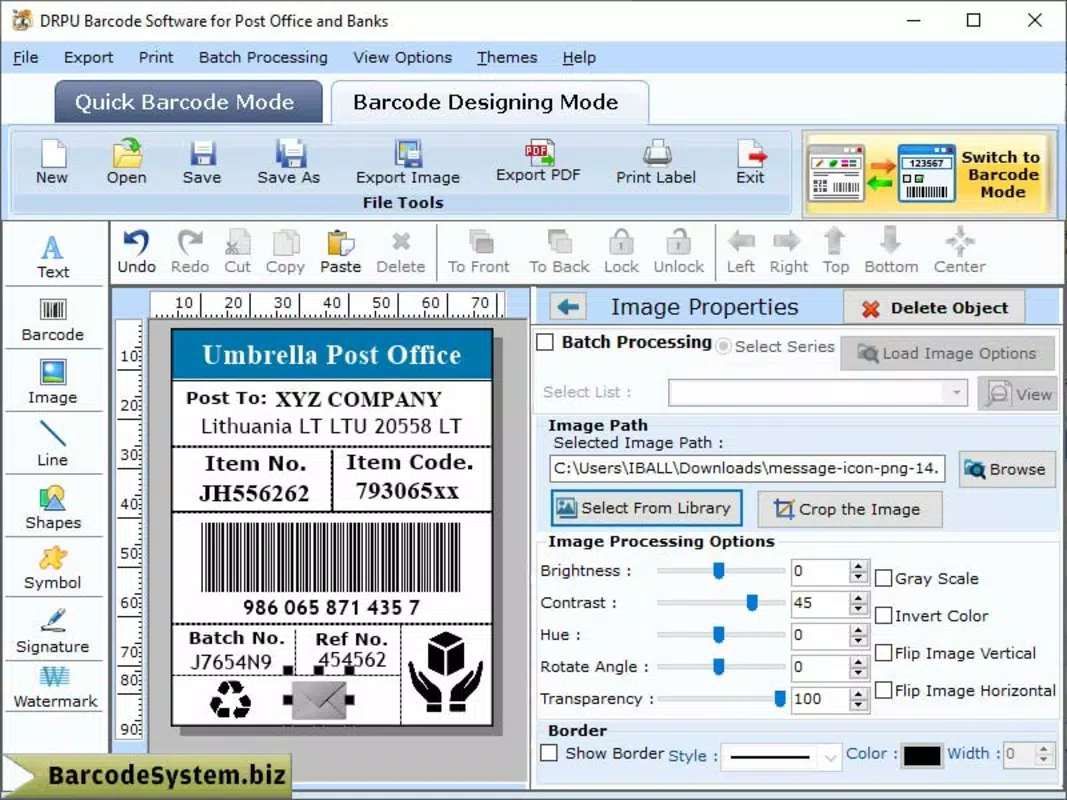
- Customizable Design Objects: Users can incorporate design elements such as lines, rectangles, arcs, and shapes to personalize barcode labels, aligning them with branding or specific project aesthetics.
- 2D and Linear Barcode Support: The application supports multiple barcode formats, including QR codes, Data Matrix, and standard linear barcodes, enhancing its adaptability across diverse use cases.
- Professional Quality Output: All generated barcodes are optimized for clarity and scannability, suitable for both digital use and high-resolution printing, meeting industry standards for commercial deployment.
- Comprehensive Help Section: A built-in guide provides step-by-step instructions and troubleshooting advice, supporting users in maximizing functionality and resolving common issues independently.
For example, a warehouse manager can use the customizable design tools to embed company logos and labels while generating QR codes for inventory tracking. Similarly, a bank employee might use the software to produce barcoded labels for client files, ensuring quick identification and secure retrieval. The support for multiple barcode types allows users to choose the most appropriate format based on scanning infrastructure and data capacity needs. These features collectively enhance operational efficiency, reduce manual errors, and improve data integrity across workflows.
Interface, UX & Performance
The user interface of Bank Barcode Label Generator Software is designed with clarity and functionality in mind. The layout organizes tools and settings in a logical manner, minimizing clutter while maintaining access to essential features. Visual elements are presented in a clean, modern style that enhances readability and reduces cognitive load during extended use. Navigation is consistent across all functions, allowing users to move seamlessly between barcode creation, design customization, and output settings.
Although the developer did not list formal performance metrics, the software’s lightweight footprint of 12.5 MB suggests efficient resource usage. Users can expect smooth operation on standard desktop systems, with minimal lag during label generation and design adjustments. Responsiveness is maintained across different screen resolutions, ensuring a consistent experience whether using a laptop or desktop monitor. Stability appears to be a focus, as the software supports continuous workflow without reported crashes or freezes during typical operations.
However, compatibility information was not fully disclosed, so users should verify system requirements before installation. The developer did not specify whether the application supports touch-based interactions or high-DPI displays. Despite these gaps, the overall user experience remains streamlined and effective for its intended purpose, particularly for users focused on accuracy and design control.
Platform Compatibility & Technical Requirements
Bank Barcode Label Generator Software is designed for desktop platforms, though the specific operating system was not listed. The application has a file size of 12.5 MB, indicating a lightweight installation that requires minimal disk space. The software version is 1.0.0, released on October 23, 2023, suggesting it is a stable initial release with core functionality intact.
The developer did not specify minimum OS requirements, making it difficult to determine compatibility with older or newer systems. Users should exercise caution when installing on unsupported platforms. Additionally, no information was provided about hardware requirements, driver dependencies, or installation prerequisites. The absence of details about mobile or web availability confirms that this is a standalone desktop application.
Given the lack of platform-specific data, users are advised to consult the official source for the most accurate compatibility information. While the software appears optimized for desktop environments, the absence of version-specific OS details limits the ability to assess broad usability across different computing environments.
Pros and Cons
Pros
- Intuitive interface suitable for users with varying technical skill levels
- Supports both 2D and linear barcode formats for versatile use cases
- Offers customizable design elements to enhance visual branding
- Produces high-quality, scannable barcodes suitable for print and digital use
- Includes a comprehensive help section to support user onboarding and troubleshooting
Cons
- Platform and OS requirements were not disclosed
- Specific hardware or system specifications were not listed
- No information on mobile or cloud-based availability
- Limited technical documentation beyond the built-in help guide
- Price point may be high for casual or individual users
FAQ
Is Bank Barcode Label Generator Software available for mobile devices?
The developer did not indicate mobile availability. The software is designed for desktop use, and no Android or iOS versions were listed.
Can I use the generated barcodes for commercial purposes?
Yes, the software is designed to produce professional-quality barcodes suitable for commercial use, including inventory tracking, document labeling, and logistics management.
What file formats are supported for exporting barcode labels?
The software supports export to common image formats, though specific formats were not listed in the provided information.
Is there a free trial version available?
The provided data does not mention a trial or free version. The software is listed at a price of $29.99.
How often are updates released for this software?
Release details were not provided. Users should check the official source for update frequency and new feature announcements.
Final Thoughts + CTA
Bank Barcode Label Generator Software delivers a focused, efficient solution for users needing to generate professional barcodes for inventory and identification tasks. Its blend of intuitive design, multi-format support, and customizable output makes it a valuable tool in environments where accuracy and branding matter. While the lack of detailed technical specifications limits broader accessibility, the software performs reliably within its intended scope.
It is particularly beneficial for small to mid-sized businesses, banking institutions, logistics teams, and administrative departments that require consistent, scannable labeling without complex software overhead. The $29.99 price point reflects its specialized utility, though users should confirm compatibility before purchase.
For those seeking a dedicated, high-quality barcode generator, this desktop tool offers a streamlined experience with real-world applicability. Download Bank Barcode Label Generator Software now


